
Learn how to check if an APK is safe before installing it on Android. Verify the source, review permissions, understand Play Protect warnings, and assess payment claims.
An APK is a file used to install an Android app. Downloading one from a website can be convenient, but a familiar app name or logo does not prove that the file came from its developer.
Before installing an APK, check its source, review the permissions it requests, and pay attention to Android’s security warnings. These steps can reduce risk, although no single check can guarantee an app is safe.
1. Identify the developer and official source
Start by finding the app developer’s official website or listing in a reputable app store. Check the website address carefully for misspellings. A page that copies a logo or app description may still be unrelated to the developer.
Watch where the download button leads. Multiple buttons, unexpected redirects, or a file hosted on an unrelated website make it harder to establish where the APK came from. If you cannot identify the source, do not install the file.
2. Compare the app details
Look for the developer name, version number, update date, and a clear description of the app. Compare those details with information published by the developer when possible.
Be cautious with files described as “modded,” “unlocked,” or offering benefits that the original app does not advertise. Those labels do not tell you who changed the APK or what changes were made.
3. Keep Google Play Protect enabled
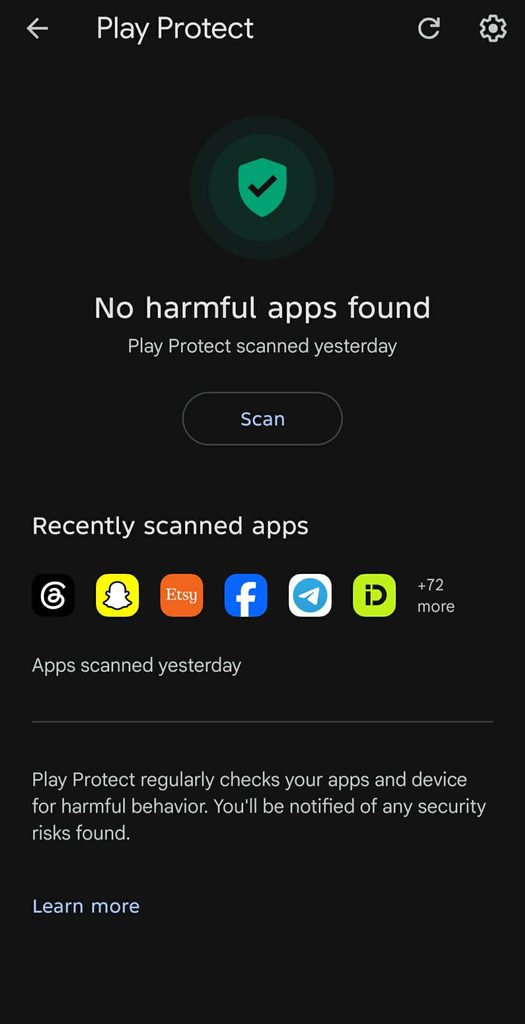
Google Play Protect checks apps for potentially harmful behavior, including apps obtained outside Google Play. To view it, open the Google Play Store, tap your profile picture, and select Play Protect.
If Play Protect warns you about an app, pause. Do not turn it off just because a download page tells you to. A scan without a warning is useful information, but it is not a guarantee that every feature or claim made by an app is trustworthy.
4. Review the permissions
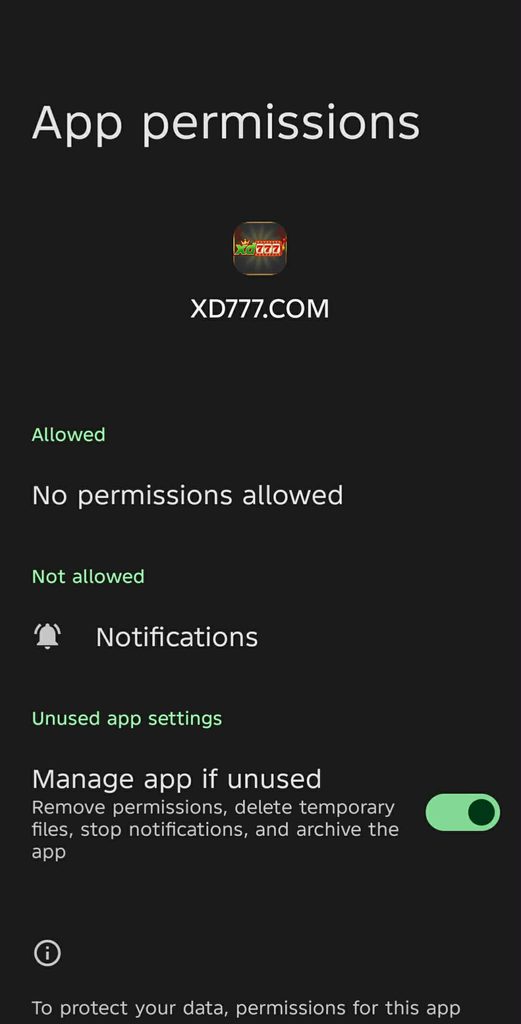
Check what the app asks to access, such as your contacts, location, camera, microphone, messages, or files. Ask whether each permission makes sense for what the app does.
The exact settings menu varies by Android phone, but you can generally review an installed app’s permissions through Settings → Apps → [app name] → Permissions. If a game requests sensitive access without a clear reason, investigate before granting it.
5. Do not ignore security warnings
Android may ask you to allow installation from a particular source when you install an APK outside an app store. Allowing that source lets the installation proceed; it does not certify that the file is safe.
If Android or Play Protect warns that an app may be harmful, stop and check the source again. Do not follow instructions to bypass a warning merely to complete the download.
6. Check payment and reward claims separately
This matters especially for games advertising deposits, withdrawals, bonuses, or cash rewards. An APK that installs without a malware warning is not proof that the operator will handle payments fairly or honor withdrawals.
Before sharing personal or financial information, look for a clearly identified operator, understandable terms, working support details, and independent evidence for important claims. Promotional screenshots and testimonials alone are not proof of payment.
How we check APKs at APKReview
When researching an app, we look for its developer and official source. We compare the app name, version, and published features with information available from that source. We also look at the download path for misleading buttons or unexplained redirects.
Where we have access to an APK file, we review available file information and security warnings. If we install and use an app ourselves, we state what we tested and when. We examine its requested permissions and note any that need further explanation.
Our reviews distinguish between features we tested, claims made by the app operator, and details we could not verify. We do not present deposits, withdrawals, or rewards as verified without evidence for those specific claims.
These checks help readers make a more informed decision. They cannot guarantee that a file is free from risk or that an app operator will act as advertised.
APK safety checklist
Before installing, ask yourself:
- Can I identify the actual developer and the source of this file?
- Do the app name and version match the developer’s information?
- Does the download avoid misleading buttons and unexplained redirects?
- Is Google Play Protect enabled, without a warning about the app?
- Do the requested permissions make sense?
- Can I verify important payment or reward claims independently?
If several answers are unclear, wait until you have better information.
Read our game reviews
You can use these checks while reading our R988 Game review and XD777 Game review Each review should make clear which details are confirmed and which remain unverified.
Editorial note: A security scan or successful installation cannot guarantee that an app is safe, legitimate, or reliable for payments. Check current information before installing an APK or sharing sensitive details.